Sub-500ms voice latency, explained in budgets
End-to-end latency is the single most important number in voice AI. Here's where every millisecond goes — and why most homemade pipelines silently double it.
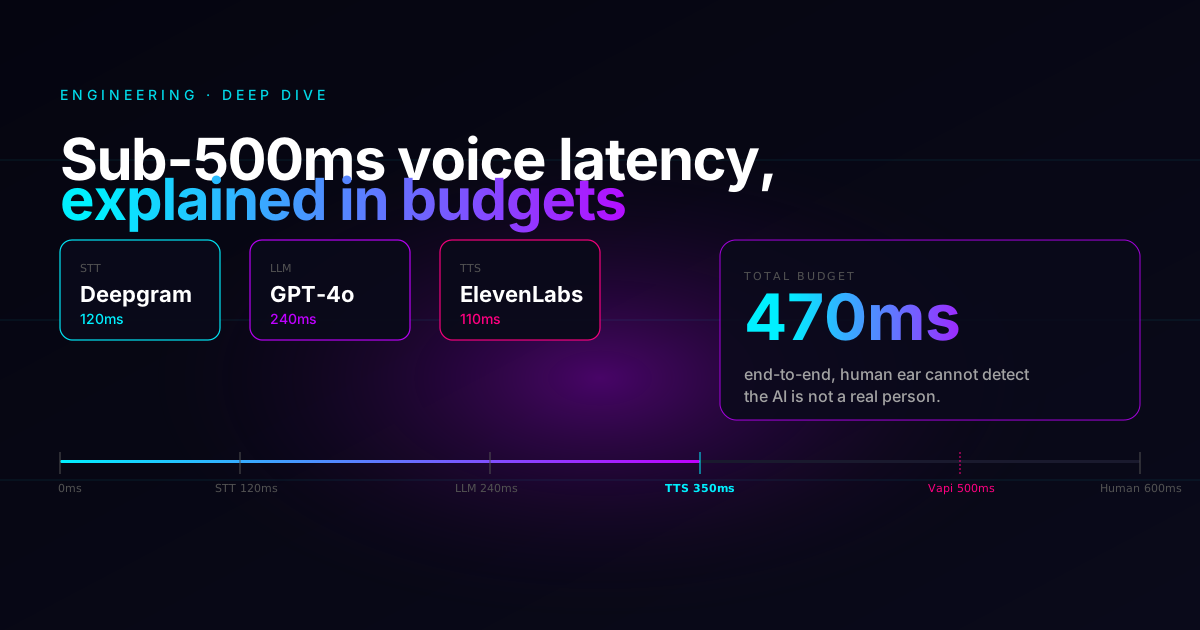
In a normal human conversation, the gap between one person stopping and the other starting is around 200-300 milliseconds. Push that gap past 800ms and the call starts feeling like a Skype call from 2009. Push past 1.5 seconds and your caller hangs up.
If you've ever called a voice agent that felt slow, this post is for you. We'll walk through exactly where every millisecond goes, the five mistakes that quietly double your latency, and how to skip the entire engineering project by using a platform that already solved it.
Building this pipeline yourself is a 2-3 month project. Spinning up an agent on Call2Me — pre-tuned to land in the sub-500ms range — takes 5 minutes and your first $10 of usage is free.
The pipeline, end-to-end
Every voice turn is a relay race with five legs. The audio leaves the caller, gets transcribed, fed to the LLM, synthesized back to audio, and replayed:
The key insight: none of these stages have to run sequentially. STT can stream partial transcripts the moment a syllable lands. The LLM can start generating the moment STT has a useful prefix. TTS can start synthesizing the moment the LLM emits its first token.
If you ever hear a voice agent wait silently for 1-2 seconds after a question, that's almost always because somewhere in the pipeline a stage is waiting for the previous one to finish instead of streaming.
A typical budget
Here's how a healthy 2026 budget breaks down with current best-in-class providers:
A few things stand out:
- The LLM is more than half your budget. TTFT (time-to-first-token) is the single biggest lever you can pull. A smaller prompt, a smaller model, or a faster provider saves 100ms+ instantly.
- Network is "free" only if you ignore it. A caller in Istanbul talking to a server in Virginia eats roughly 90ms each direction before any model runs.
- TTS gets the smallest slice but the highest variance. A bad TTS choice can balloon to 400ms+. ElevenLabs Flash, Cartesia, and Deepgram Aura sit in the 100-150ms range.
These numbers come from published provider benchmarks (Deepgram, OpenAI, ElevenLabs) plus our own testing under good network conditions. Real-world numbers vary with prompt size, region, time of day, and which models you pick.
Latency is not a knob you tune at the end. It's a budget you allocate at the start, and every architectural decision either spends or saves part of it.
The five mistakes that silently double your latency
Voice agents that "feel slow" almost always lose their budget the same five ways.
1. Waiting for the LLM to finish before starting TTS
This is the big one. Don't.
Stream the LLM's tokens directly into the TTS engine as they arrive. The first phoneme should be synthesized before the LLM has finished forming the sentence. Modern TTS engines accept token streams natively — you just have to wire them up.
# DON'T do this
text = await llm.complete(prompt)   # blocks for 800ms+
audio = await tts.synthesize(text)  # blocks for 400ms+
await play(audio)
End-to-end: 1200ms+. The caller waits in dead silence the whole time.
# DO this
async for token in llm.stream(prompt):
    tts.feed(token)              # streams to TTS as we go
async for chunk in tts.audio():
    await playback.write(chunk)  # plays as TTS produces
End-to-end: ~470ms. First syllable starts playing while the LLM is still thinking.
(Or just use Call2Me — this is wired up by default for every agent you create.)
2. Oversized system prompts
Someone reads a "prompt engineering best practices" blog post that suggests detailed personas, lots of examples, edge case handling — and ends up with a 10,000+ token monolith.
Every extra 1000 tokens adds roughly 40-80ms to TTFT. In bad cases, most of the response delay is the model just reading its instructions before producing the first word of the reply.
The fix: trim ruthlessly. Keep the prompt focused on behavior (tone, rules, structure). Move facts (menu items, opening hours, FAQs) into a knowledge base where they're retrieved only when relevant.
Call2Me's agent setup wizard generates a tight, locale-correct system prompt for you in 9 languages — TR, EN-US, EN-GB, DE, FR, ES, IT, PT-BR, AR. No 10k-token monoliths by default.
3. Single-region deployment
A voice agent in us-east-1 serving a caller in São Paulo eats roughly 110ms each
direction in network latency alone. That's 220ms before any model has touched the
audio.
You have two options:
- Deploy to multiple regions and route callers geographically.
- Use a provider that does this for you.
Either way, don't default to us-east-1 because that's where your other services
live.
4. No endpointing tuning
Endpointing is the system that decides "okay, the caller stopped talking, time to respond." Default endpointing in many SDKs waits 600-800ms of silence to be sure the caller is really done.
That's a free 600-800ms of dead air on every turn. Tune it down with a VAD (voice activity detection) model like Silero:
A VAD threshold around 300ms is usually a good starting point — responsive enough to feel natural without interrupting people who pause to think mid-sentence. Call2Me's voice agent ships with Silero VAD pre-tuned in this range.
5. Synchronous knowledge base lookups
The classic anti-pattern: agent asks the LLM, LLM decides it needs to look something up, agent runs vector search, agent feeds result back to LLM, LLM continues. That round-trip adds 200-400ms per lookup.
Better: prefetch likely chunks based on the conversation so far, and have them sitting in the prompt context before the LLM even asks. Or run the search in parallel with the LLM, and inject the result mid-response if the LLM signals it needs it.
This is exactly the architecture Call2Me uses under the hood — knowledge bases are a first-class object, not an external function call you bolt on.
What "first byte" really means
When marketing pages say "200ms latency," they almost always mean time to first token of the LLM. That's not what your caller experiences.
Your caller experiences this:
caller_stopped_talking_at → audio_started_playing_at
That's the only number that matters. Everything else is vanity. Measure that, optimize that, report that.
How Call2Me approaches it
The Call2Me voice agent uses LiveKit Agents with this default stack:
| Stage | Provider |
|---|---|
| STT | Deepgram Nova-3 (streaming) |
| LLM | OpenAI GPT-4o (and 17 alternatives) |
| TTS | ElevenLabs (Flash by default) |
| VAD | Silero |
| Transport | LiveKit WebRTC + SIP |
Each piece is independently swappable per-agent (you can pick GPT-4o-mini for cheaper calls, Cartesia for cheaper TTS, etc.) but the defaults are tuned to land in the sub-500ms range under typical conditions.
Everything in this post — streaming pipeline, tuned endpointing, prefetched RAG, default model stack — is built into Call2Me out of the box. You can have a working sub-500ms voice agent on a real phone number in under 10 minutes.
You get $10 in free credits on signup. No credit card required.
Want to feel the difference yourself?
The fastest way to internalize what 470ms feels like is to actually call one and have a real conversation. Spin up a Call2Me agent free, point it at a phone number, and call it.
If it feels like a phone call, we did our job.