A web scraper
you just talk to.
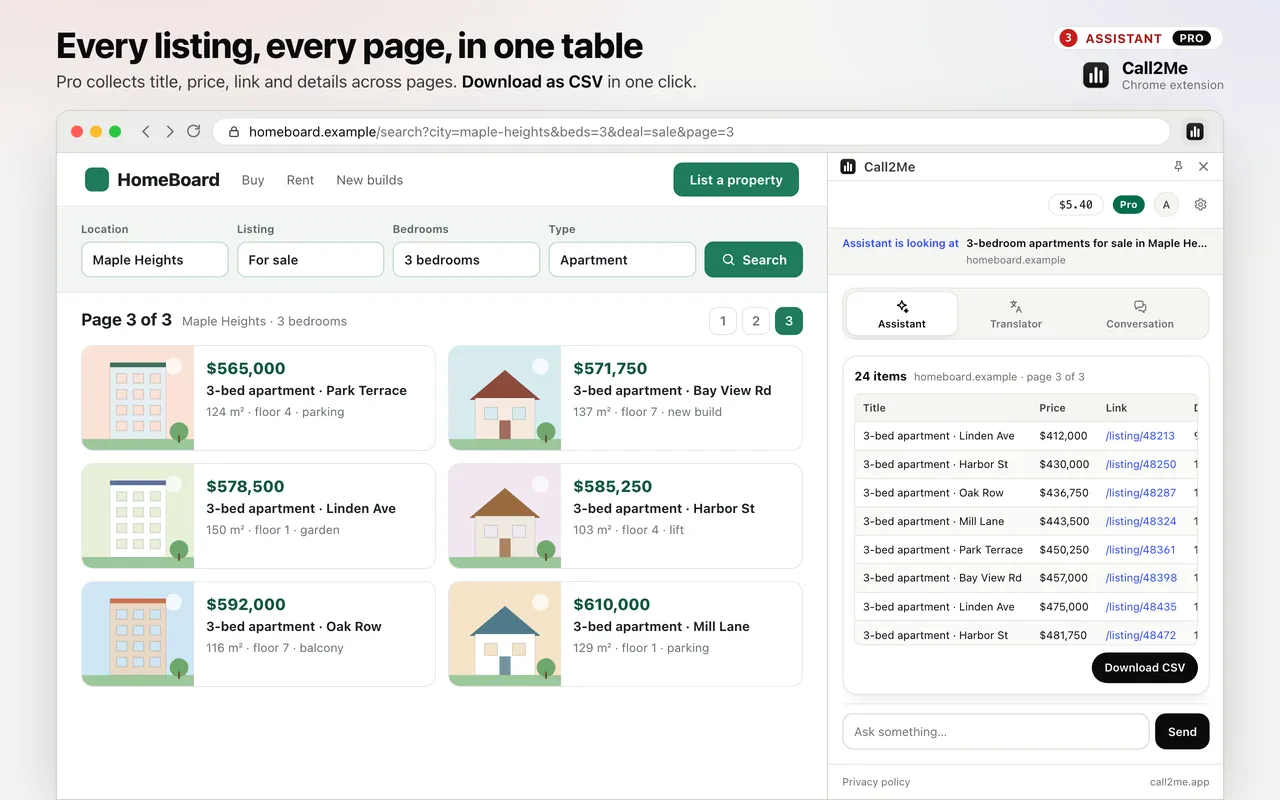
Open a page of listings, products or a table and say what to collect. The assistant turns it into rows in the side panel, follows the next pages up to 10, and you download a CSV.
Ask, don’t configure
“Collect these listings, three pages.” No selectors to pick, no recipe to build.
Follows pagination
It finds the next-page link on the same site and keeps going, up to 10 pages, skipping duplicate rows.
Check, then download
Rows appear in the side panel first, so you see what you get before you save the CSV.
Three steps, out loud
Open the page
Search results, a product grid, a price table — any page with rows of things.
Say what to collect
Press Alt+J and ask. Say how many pages, up to 10.
Download CSV
Check the table in the side panel, then press “Download CSV”.
What it collects, and where it stops
- Reads repeated cards (title, price, link, details) or HTML tables (their own headings).
- Up to 200 rows per page and 1,000 rows in total.
- Collects only when you ask, from the tab you are looking at.
- Some sites block automated reading or lay out listings in ways it cannot read; check the table before you download.
- More on the feature: export listings to CSV. The same extension also does live tab translation.
What it sends, and what it keeps
The table is built and kept in your browser, and the CSV is created on your device.
A short sample of the first rows goes to the assistant only so it can tell you what it found; it is not saved.
The assistant never reads the values you type into fields, and never touches password, card or one-time-code fields.
Read the extension privacy policy →Questions
How is it different from a selector-based scraper?
There is nothing to configure. You open the page and say what you want collected; the extension finds the repeated rows — cards of listings or products, or an HTML table — and shows them as a table in the side panel.
Which columns do I get?
For listings and product grids: title, price (when the page shows one), link and details. For an HTML table: the table’s own column headings.
Does it work on every website?
No. It works on pages built from repeated cards or HTML tables. Sites that block automated reading, or draw their listings in unusual ways, may give no rows or the wrong ones — always check the table in the side panel before you download.
How many pages and rows?
It follows the next pages of the same site, up to 10, with up to 200 rows per page and 1,000 rows in total.
Do I need Pro?
Yes. Collecting tables is a Pro feature — Pro is any Call2Me account with a $10+ top-up in the last 12 months. It runs on your Call2Me balance, per minute of active conversation; silence is free.
Is the data uploaded anywhere?
No. The table is built and kept in your browser, and the CSV is created on your device. A short sample of the first rows goes to the assistant only so it can tell you what it found; it is not saved.
Also in the same extension
Voice browser assistant
Ask the page out loud, summarise articles and YouTube videos. On Pro it clicks, types and fills in forms for you.
Listings to CSV
Collect listings, products or a table across up to 10 pages into a table you download as CSV. Pro.
Live tab translation
Hear any tab dubbed into your language in real time, with live subtitles. 39 languages.
Interpreted conversation
Send a link; they join from their browser and an AI interprets both ways. $0.25/min.
Phone calls from the browser
Call any number from your own Call2Me number. No AI on the line. From $0.14/min.
Turn the next page of results into a spreadsheet
Install the extension, open a page of listings, press Alt+J and say what to collect.