Too long to read?
Ask for the summary.
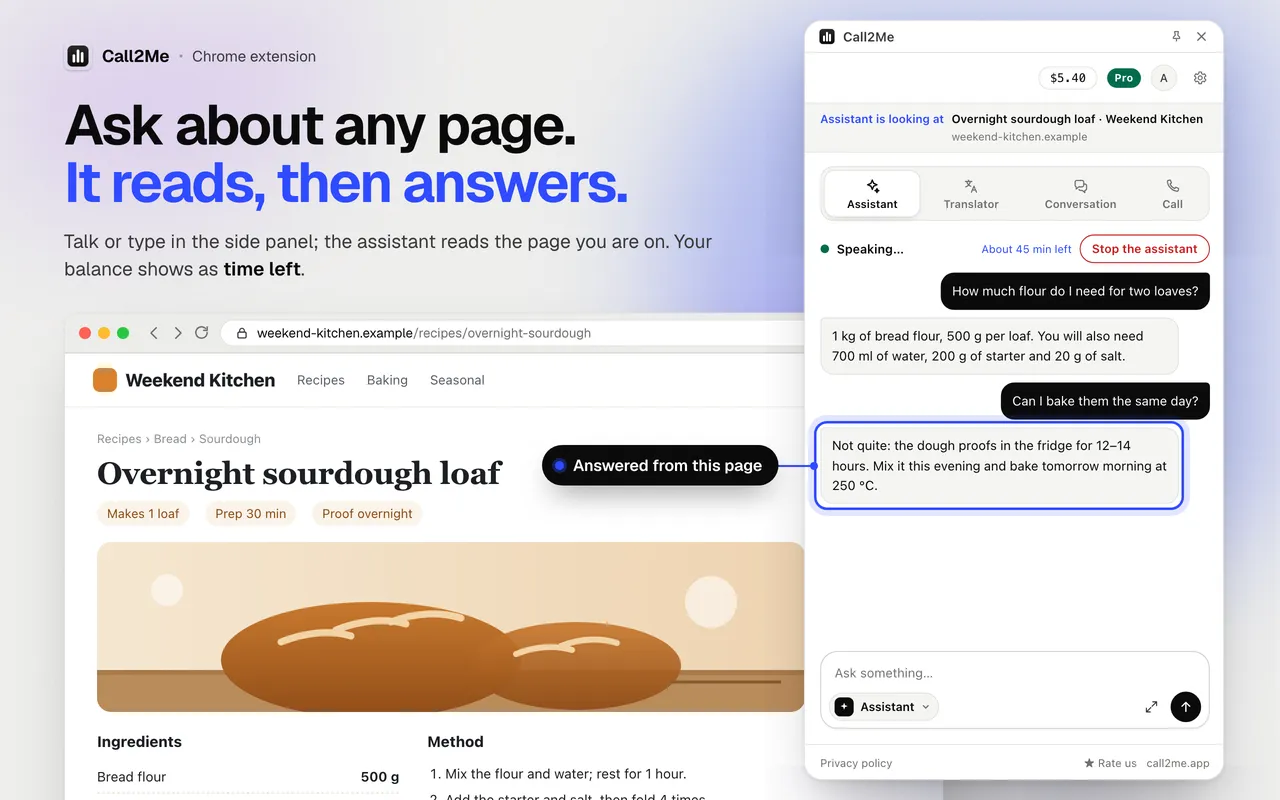
Open an article or any page, press Alt+J and ask for a summary. The assistant reads the page you are on and tells you what it says, out loud or in writing. Then ask what you actually wanted to know.
Reads the page you are on
No pasting text into another site. The assistant reads the tab you are looking at.
Then answers your question
“What does it say about delivery?” “Is there a deadline?” Ask after the summary, by voice or in writing.
Pro: other pages too
Name a few pages and it reads them in a background tab and sums them up together.
How it works
- 01
Open the page
An article, a long post, documentation, a product page.
- 02
Press Alt+J and ask
“Summarize this page” or “What are the main points?” Speak or type.
- 03
Ask a follow-up
The answer comes from the page. Ask for detail, a list or a shorter version.
What it reads, and how much
- The readable text, title and address of the tab you are looking at, only while the assistant is open.
- About 24,000 characters at a time. On a longer page it keeps the beginning and the end and leaves out the middle; on Pro it can read one section by its heading.
- It replies in your browser’s language by default, so a page in another language is summarized in yours.
- Pro: reads pages you name in a temporary background tab (up to 12,000 characters each, up to 8 for one request) and compares up to 5 open tabs.
- Watching instead of reading? Summarize a YouTube video from its captions.
- Want the page as an image instead? Take a full-page screenshot.
What it sends, and what it keeps
A one-time screen explains what the assistant sends and asks for your consent before the first use.
The address is sent as site and path only, never the part after ? or #.
It never reads the values you type into fields; on a page with a visible password, card or one-time-code field it sends no page text at all.
The page text goes to Call2Me and its providers only to answer you; Call2Me does not save it.
Read the extension privacy policy →Questions
Which pages can it summarize?
Ordinary web pages with readable text: articles, blog posts, documentation, product pages, news. It reads the page you are looking at, the same text you see.
Do I have to copy and paste the text?
No. Open the page, press Alt+J and say or type “summarize this page”. The assistant reads the page itself.
How long a page can it read?
About 24,000 characters at a time. On a longer page it keeps the beginning and the end and leaves out the middle. On Pro you can ask it to read one section by its heading.
Can it summarize several pages at once?
On Pro, yes. Name the pages (or ask it to “browse the news and sum it up”) and it reads them in a temporary background tab, up to 8 for one request, while the tab you are on stays put. It can also compare up to 5 open tabs.
Can it summarize a PDF?
In the AI chat on the same side panel you can attach a PDF and ask for a summary. That chat is paid per answer from balance you topped up with real money; prices are shown in the model list.
Which pages does it not read?
On a page with a visible password, card or one-time-code field it sends no page text at all. It never reads the values you type into fields, and it does not run on Chrome’s own pages or the Chrome Web Store.
What does it cost?
Try it for 2 minutes without an account. After that it uses your Call2Me balance, including the welcome credit new accounts get when they verify their email: a typed summary costs a few cents, and talking is billed per minute of active conversation (silence is free).
Also in the same extension
AI browser assistant
Ask the page out loud or in writing. On Pro it clicks, types, fills in forms, reads other pages for you and makes files.
YouTube video summarizer
A summary of the video you are watching, made from its captions.
Full-page screenshot
The whole page as one PNG, made on your computer. No account needed.
Listings to Excel, CSV or JSON
Collect listings, products or a table across up to 10 pages and download the file. Pro.
Price tracker and page checks
Have a page checked on a schedule, at most hourly, and get told when the price drops. Pro.
Live tab translation
Hear any tab dubbed into your language in real time, with live subtitles. 39 languages.
Interpreted conversation
Send a link; they join from their browser and an AI interprets both ways. $0.25/min.
Phone calls from the browser
Call any number from your own Call2Me number. No AI on the line. From $0.14/min.
Get the point of the next long page
Install the extension, open any article, press Alt+J and ask for a summary.